Fast Feedback’s typed marking pipeline compares every student answer to a teacher model, generating WWW/EBI, reteach and extension tasks automatically. It also supports handwritten uploads, turning photos into text for the same instant, AI-powered feedback.
In our last post, we looked at how Fast Feedback marks multiple-choice quizzes in seconds. This time, I wanted to share how it works for longer, typed answers — the kind that really reveal pupils’ understanding. I actually started Fast Feedback to mark exactly this type of question. As a teacher, I always found that multiple-choice quizzes could only take you so far. The typed-marking pipeline closes that gap by analysing the quality of written responses against a teacher model and providing meaningful, next-step feedback.
It even accepts handwritten answers through OCR, so it fits naturally into any classroom routine. The whole process mimics how teachers and departments approach marking at scale — just faster, more consistent, and without the hours of manual work.
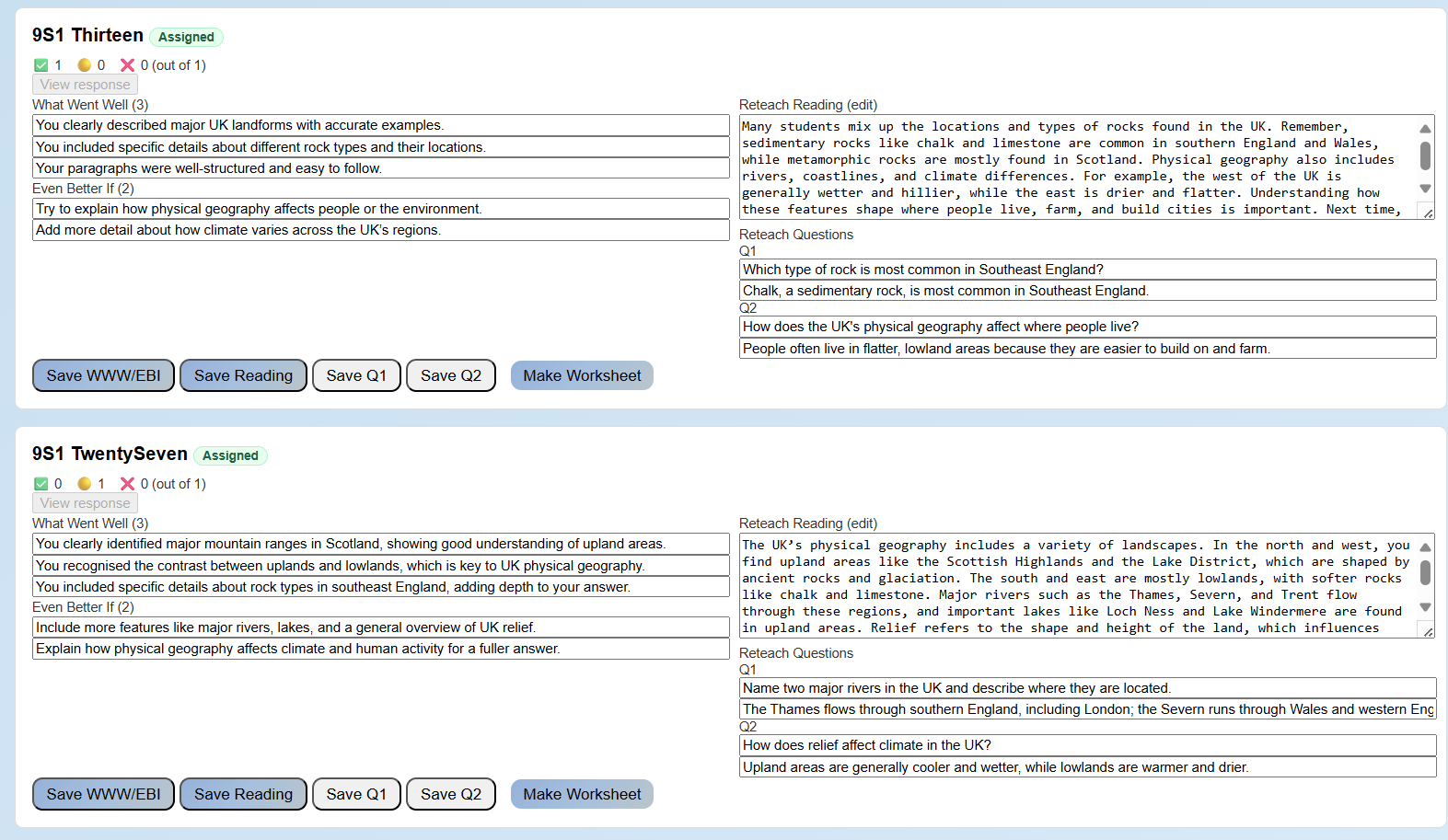
The screenshot below shows an example of our typed-marking pipeline in action. It displays automatically generated WWWs, EBIs, reteach reading and reteach questions. Teachers can quickly review these, edit where needed, and then assign reteach tasks to pupils. In practice, we find the model is highly accurate — feedback reads as though it’s been written by a teacher, but appears in seconds rather than hours.
How the typed-marking pipeline works
The process mirrors how teachers naturally assess written work — but at scale and in seconds. Each answer is compared to the teacher’s model using semantic pattern matching, which looks for meaning rather than exact keywords. As a teacher, I used to mark by comparing each response to a mark scheme or model answer; AI can now do this with remarkable speed and consistency.
The system checks for accuracy, coverage and depth, then builds personalised feedback: what went well, what could be improved, and a short reteach explanation with follow-up questions. Even when an answer is fully correct, it adds a stretch prompt to deepen understanding and strengthen knowledge retention. All of this is powered by bespoke prompts to our own Large Language Model, designed specifically for educational feedback.
Two contrasting responses
In the example above, two students in the same class tackled a question about how the UK’s physical geography varies — considering regions, rock types, relief and landscape-shaping processes. 9S1 Thirteen produced a detailed and accurate answer, earning positive WWW comments and an extension prompt to consider how rivers shape the landscape through erosion and deposition. 9S1 Twenty Seven, on the other hand, gave a partial answer that missed some key ideas about relief. The feedback for this student focused on reteaching elevation and slope, with targeted questions to close that gap.
Together, these examples show how Fast Feedback personalises marking: both pupils receive individualised feedback that’s accurate, developmental, and immediate — whether they’ve mastered the concept or need a reteach task.
Why it matters for teaching and learning
Because every answer is compared to the teacher’s model, the feedback feels authentic — it mirrors how teachers naturally write comments, but removes the time barrier. It’s accurate enough to trust, fast enough to use the same day, and detailed enough to drive real improvement. Teachers can assign reteach questions immediately, track who’s closed their gaps, and use extension prompts to stretch those already secure.
Ultimately, this is a game changer for both teacher workload and pupil progress. It brings together the best of classroom practice and AI — helping teachers do what they do best: respond to learning, not spend hours marking.
By Tom – tom@fastfeedback.co.uk